
Capture Full Websites in One Click
Overview
WebShot is a desktop application designed for capturing entire web pages as high-quality images. It enables users to take full-sized screenshots of websites, preserving the complete scrollable content in a single image. This functionality is ideal for archiving web content, creating documentation, or sharing visual summaries of online resources. The software supports multiple output formats including JPG, PNG, GIF, and BMP, offering flexibility for various use cases. It is particularly useful for professionals who need to document web-based information without relying on browser-based tools or manual scrolling and stitching.
Target users include content creators, web researchers, digital archivists, and technical writers who require accurate, full-page visual records. The freeware version includes a demo of the command-line interface, which can be upgraded for automation tasks across multiple websites. Additionally, a server edition is available with a DLL for integration into custom applications, expanding its utility for developers and enterprise environments. Real-world scenarios include generating visual reports, preserving e-commerce product pages, or capturing dynamic web content for internal review.
Key Features & Capabilities
- Full Web Page Capture – Capture entire websites from top to bottom, including content that requires scrolling, in a single image.
- Multiple Output Formats – Save screenshots in JPG, PNG, GIF, or BMP formats to suit different needs and compatibility requirements.
- Command-Line Interface (CLI) Demo – The freeware version includes a CLI demo, enabling batch processing and automation of screenshot tasks.
- Server Edition with DLL Integration – Developers can embed WebShot technology into their own applications using the provided DLL.
- CSV Output with Redirect URLs – Capture data can be exported to CSV with redirect tracking, useful for auditing or monitoring web content changes.
These features support workflows such as archiving live websites, generating visual reports, or integrating screenshot functionality into automated systems. The CLI demo allows users to script capture tasks, making it efficient for processing multiple pages. The DLL integration opens possibilities for developers to extend their own tools with web capture capabilities, enhancing productivity in software development and content management.
User Interface, Workflow & Performance
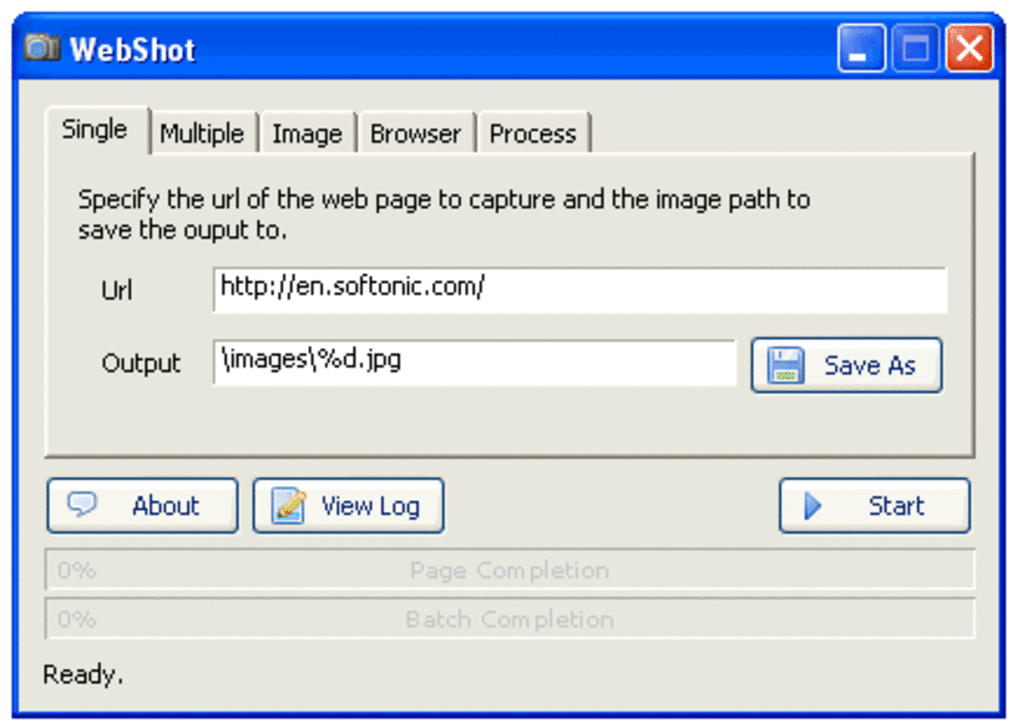
The user interface of WebShot is designed for straightforward navigation, allowing users to input a URL and initiate a capture with minimal steps. The workflow is linear: enter the web address, configure output settings, and start the process. The interface appears to prioritize simplicity, with essential controls clearly labeled and accessible. While specific details about UI layout are not provided, the structure suggests a focus on usability for both casual and advanced users.
Performance is expected to be efficient given the software’s lightweight nature—only 2.1 MB in size. However, exact performance metrics such as CPU or RAM usage were not specified. The developer did not provide additional system requirements. Based on general software behavior, the application is likely to operate smoothly on modern systems. Stability during long-running captures is not confirmed, but the inclusion of a /waitimgloop fix in the latest update suggests ongoing attention to reliability.
Compatibility & System Requirements
WebShot is compatible with both Windows and Mac operating systems, making it accessible to a broad user base. The current version is 2.3.1, released on April 15, 2024. The installation file size is 2.1 MB, indicating a lightweight footprint. The developer did not specify exact system requirements, including minimum CPU, RAM, or disk space needs.
Compatibility information is limited to the operating systems listed. No details were provided about support for older OS versions or specific hardware configurations. Users should verify functionality on their specific setup, especially if deploying in enterprise environments or using older machines. The software’s small size suggests it is designed for efficient deployment across diverse systems.
Pros and Cons
Pros
- Efficiently captures full web pages without manual stitching
- Supports multiple image formats for versatile output
- Freeware version includes a CLI demo for automation
- Server edition allows integration via DLL for custom applications
- Lightweight installation at only 2.1 MB
Cons
- Exact system requirements were not listed
- Performance details such as resource usage were not provided
- Command-line features are limited to a demo in the free version
- No information on update frequency beyond the latest release
- Interface details and customization options are not described
FAQ Section
Is WebShot available for both Windows and Mac?
Yes, WebShot supports both Windows and Mac operating systems, ensuring broad accessibility across desktop platforms.
Can I use WebShot without paying?
Yes, the freeware version is available at no cost. It includes a demo of the command-line interface, with full functionality available through a paid upgrade.
Does WebShot require an internet connection?
Yes, an active internet connection is required to access and capture web pages, as the software retrieves content directly from online sources.
Is the software safe to download and install?
WebShot is distributed as a legitimate desktop application. As with any software, it is recommended to download from official sources to ensure integrity and avoid potential security risks.
Can I automate website captures using WebShot?
Yes, the freeware version includes a command-line interface demo, which can be used to script and automate screenshot tasks across multiple websites.
Final Thoughts + CTA
WebShot delivers a focused and effective solution for capturing full web pages as images. Its ability to produce complete screenshots in various formats makes it a valuable tool for professionals who need reliable visual documentation. The inclusion of a CLI demo and a server edition with DLL integration adds significant value for users seeking automation and integration capabilities. While system requirements and performance details are not fully disclosed, the lightweight design and cross-platform support enhance its appeal.
For content creators, researchers, and developers, WebShot offers a streamlined way to preserve web content. The free version provides meaningful functionality, while the paid upgrade unlocks advanced features. Its consistent updates and improvements, such as the fix for /waitimgloop, reflect ongoing development.
Download WebShot now







